Walk into tax season with your records already in order.
Vincere: Rental Tax Tracker turns a year of scattered receipts, invoices, and spreadsheets into organized, property-by-property records you can hand to your tax professional — captured in seconds on your iPhone, encrypted on your device and never uploaded to our servers.
Vincere is recordkeeping and organization software. It is not a tax preparation service and does not provide tax, legal, or financial advice. Read the full disclaimer.
The problem isn't the deductions. It's the paperwork.
Most small investors don't lose money at tax time because they picked the wrong strategy — they lose it because a receipt went through the wash, an expense never got assigned to the right property, or nobody could remember whether the $4,800 to the contractor was a repair or an improvement.
Receipts that survive the year
Capture a receipt the moment you get it. The image and the amounts are stored together with the expense, so the documentation is attached to the record instead of sitting in a shoebox.
Every dollar tied to a property
Expenses are recorded per property from the start, so you're never reconstructing which building a Home Depot run belonged to eleven months later.
A handoff your preparer can actually use
Export an organized summary and line-item detail instead of a folder of photos — less back-and-forth, fewer billable hours spent on data entry.
What the app does
Built for the investor with one property or a dozen — not an accounting department.
Property-by-property tracking
Keep each property's income, expenses, purchase details, and documents in its own place, with a portfolio view across everything you own.
On-device receipt scanning
Point your camera at a receipt and the app reads the merchant, date, and total using Apple's on-device text recognition — the image is processed on your iPhone, not sent to us for processing. You can correct anything before it's saved.
Categories that line up with Schedule E
Expenses are sorted into categories that map to the familiar rental-property expense lines on Schedule E — advertising, auto & travel, cleaning & maintenance, insurance, mortgage interest, repairs, supplies, taxes, utilities, management fees and more — plus practical extras like mileage, HOA fees, LLC fees, and software subscriptions.
Year-end summary package
Generate a PDF summary organized by property and expense category, with line-item detail behind it, ready to email or print for your CPA, EA, or tax preparer. CSV export is there when someone wants the raw rows. It summarizes your own records — it is not an IRS form and has not been reviewed by a tax professional.
Repair vs. improvement prompts
When you log a larger job, the app asks the questions that usually decide how the work gets treated — what was replaced, was it restored or upgraded, what did it cost relative to the property — and records your answers alongside the expense. It records your reasoning; it does not decide the tax treatment for you.
Document vault
Leases, insurance policies, closing statements, 1099s, warranties, inspection reports — filed against the property they belong to, so they're findable in March instead of mysterious.
Tenant & lease records
Track who's in which unit, lease start and end dates, and rent amounts — the details that feed your rental income records and renewal reminders.
Portfolio & performance view
See income against expenses per property and across the portfolio, with estimated value trends derived from the FHFA House Price Index — public U.S. government data, applied at the state level. Estimates are informational only, not appraisals.
See what you hand your accountant
This is what a year of captured receipts turns into — organized by property, by category, with the line-item detail behind it. Look at it before you decide whether this is worth your time.
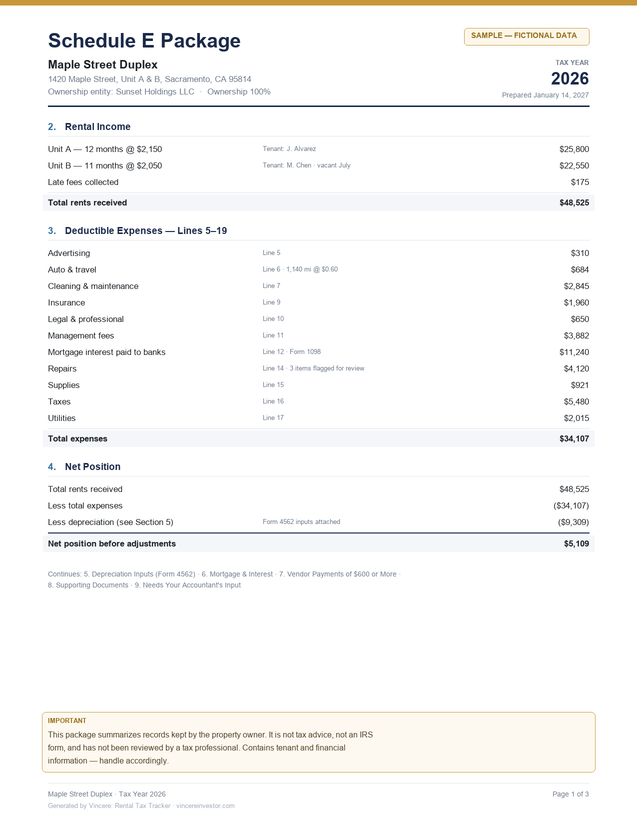
Nine sections, in the order your preparer reads them
Property identification, rental income, deductible expenses, net position, depreciation inputs, mortgage & interest, vendor payments of $600 or more, supporting documents, and a final section listing the open questions only your accountant can answer.
Sample with fictional data, for illustration. Your own package reflects only the records you enter. It summarizes your records — it is not an IRS form and has not been reviewed by a tax professional.
How it works
Four steps, most of which take seconds.
-
Add your properties
Address, purchase date and price, and the basics. Two minutes per property, once.
-
Capture as you go
Scan the receipt or enter the expense when it happens, assign it to a property and category, and move on.
-
File the paperwork
Drop leases, statements, and policies into the property's document vault so everything lives in one place.
-
Hand off at year end
Export the summary package and detail, and give your tax professional organized records instead of a shoebox.
Your financial records stay yours
This is your property portfolio, your tenants, and your money. Your records live on your iPhone and are never uploaded to our servers — we have no copy of them and no way to read them.
Stored on your device
Property, expense, tenant, and document records are stored locally on your iPhone — not in our cloud. We can't read them, because we never receive them.
Encrypted at rest
Your records are encrypted on your device with AES-256-GCM, the key held in the iOS Keychain. Vault files that can't be written through that layer fall back to iOS Data Protection, tied to your device passcode.
No account required
No sign-up and no password to breach — the app works without one. You only share an email address if you choose to contact support.
No ads, no tracking SDKs
No third-party advertising or analytics frameworks. We don't build a profile on you and we don't sell data — there's nothing to sell.
We'd rather be precise than absolute. Three things go out, and none of them are your records:
- Address validation — a property address you type is sent to Apple's geocoding service to verify it.
- Housing price data — the app downloads the FHFA House Price Index (public U.S. government data) to estimate values. Nothing about your properties is sent with that request.
- Support messages — only if you write to us. That sends your email address, your message, the app version, device model and an anonymous identifier.
Because your records live on your device, your backups are your safety net — keep iCloud or encrypted local backups on, and export regularly. Full detail in the Privacy Policy.
This is recordkeeping software, not tax advice.
Vincere Real Estate LLC is not a certified public accounting firm, a law firm, an enrolled agent, or a registered tax return preparer. Vincere helps you organize and document information about your properties. It does not prepare, review, sign, or file tax returns, and nothing in the app or on this site is tax, legal, accounting, or investment advice.
Category names in the app reference common rental-property expense lines as an organizational convenience. Whether a given expense is deductible, how it should be characterized, and how it should be reported depend on your specific facts and current law — questions only a qualified tax professional who knows your situation can answer. Always review exported records for accuracy before relying on them or sharing them.
Stop reconstructing the year in April.
Vincere is built for investors who'd rather spend tax season reviewing numbers than hunting for them.